.svg)
%201.svg)
April 24, 2026
%201.svg)
Abirami Karthikeyan
TL;DR
This blog is part one of a two-part series exploring the real-world differences between Cortex Code and Databricks Genie Code. In this first blog, we focus on how these tools operate in real development environments and what that means for modern data teams. The second blog continues the series by diving deeper into business context, semantic understanding, and enterprise impact.
When Databricks announced Genie Code on March 11, 2026, it initially peaked the interest of data and engineering teams. The positioning was compelling—an autonomous artificial intelligence agent designed to support data engineering and analytics.
At first glance, it sounded like the next natural evolution of Databricks Assistant, the two-year old co-pilot that Databricks users had been waiting for. But a closer look at how modern data teams’ needs have evolved, especially in production-ready enterprise environments, reveals a different reality: development isn’t linear, and data and AI workflows rarely live within a single interface.
On the other hand, Snowflake Cortex Code is a fully enterprise-aware AI coding agent. It understands your full enterprise environment, autonomously builds, tests, debugs, and optimizes end-to-end data engineering, data science, and AI workflows, and works seamlessly across UI, the terminal, and code editors like VS Code and Cursor.
Cortex Code dramatically accelerates everything from ingesting data with Openflow, to developing dbt pipelines, developing complex ML models, or building AI agents all in natural language with high accuracy and trust.
So the more interesting question becomes:
What actually happens when you try to use these two tools in the real world? What should you actually be evaluating when choosing between Genie Code and Cortex Code?
This is not just a comparison between two tools. It is a reflection of two fundamentally different philosophies about how modern data development should happen.
So instead of looking at this as a feature comparison, let’s step back and ask a different set of questions that consistently come up in real-world scenarios.
Cortex Code vs Genie Code: Where Do You Actually Work?
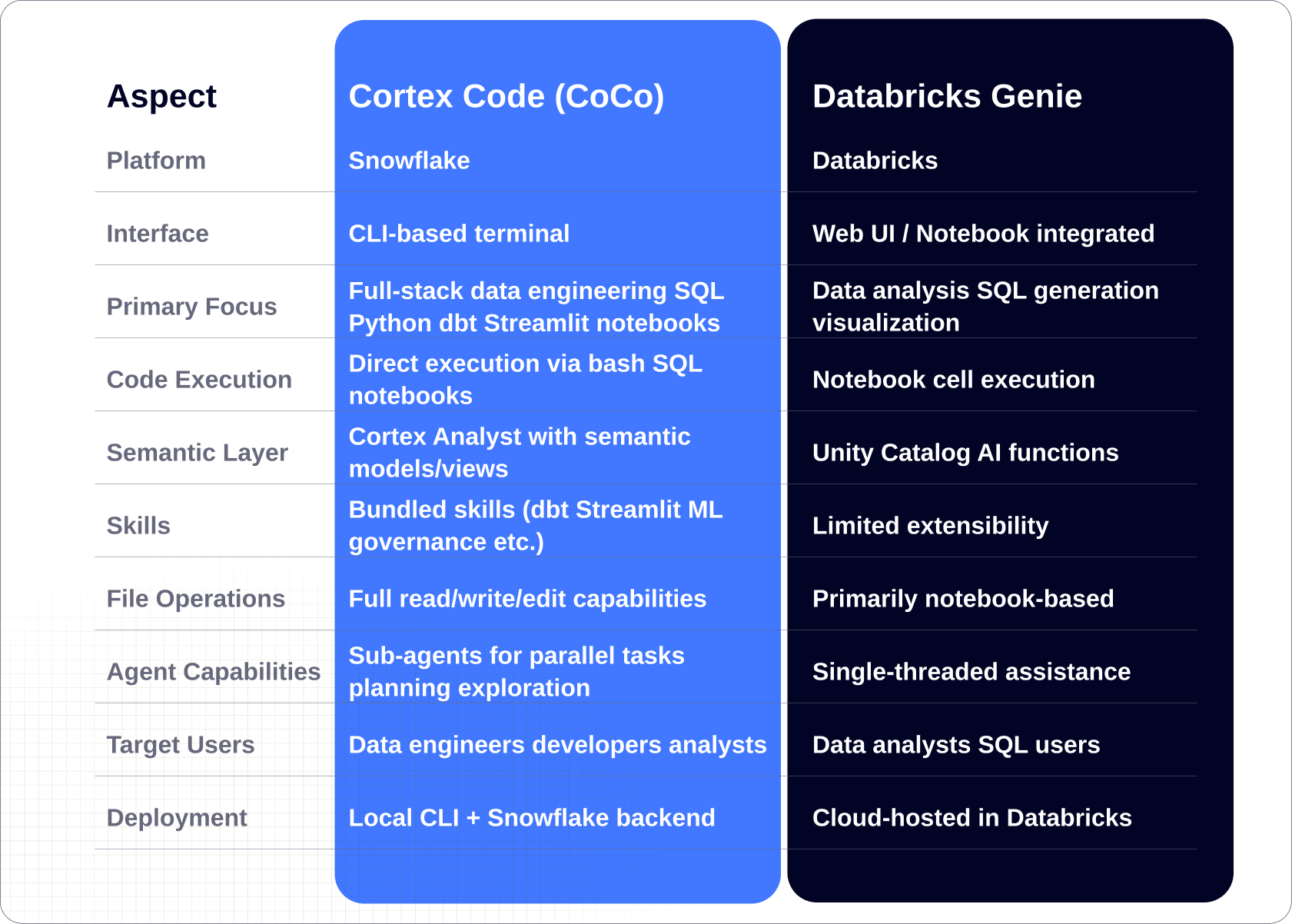
One of the simplest questions often reveals the biggest differences: Where does the tool allow you to work?
Genie Code is entirely bound to the Databricks workspace.
With no CLI equivalent and no ability to write and execute arbitrary code, like Cortex Code , Genie Code requires customers to continue using Databricks alongside third-party tools.
In practice, development does not happen in one place. Engineers move between terminals, integrated development environments, repositories, pipelines, and local environments. They debug locally, commit to version control, integrate with deployment pipelines, and orchestrate across multiple tools.
Genie Code does not meet you in that reality.
It operates entirely within a browser-based, notebook-style environment, designed around a controlled workflow. As a UI-only experience with no command-line equivalent, it cannot be scripted, automated, or integrated into real development pipelines.
It also lacks access to local files, external tools, Git repositories, and broader development environments, meaning teams still need additional tools to complete real-world workflows. And that creates a subtle but important friction where you are constantly adapting your workflow to the tool.
These boundaries start to compound and have serious implications for data teams focused on Enterprise scale workloads.
Cortex Code approaches this very differently.
Cortex Code enables faster end-to-end delivery by working where developers work, across CLI, IDE, and UI, reducing rework, improving accuracy, and accelerating outcomes with built-in security and governance.
Cortex Code works across the command line interface, Snowflake user interface, and development environments such as Visual Studio Code and Cursor.
It gives developers native access to local filesystems, code repositories, and developer tooling, allowing them to build directly within their existing environments without constraints.
It allows you to operate in your terminal, access and modify local files, integrate directly into continuous integration and continuous deployment pipelines, and perform git operations as part of your natural workflow. It does not ask you to change how you work. It fits into it.
And that single difference quietly shapes everything else.
.webp)
Is Genie Code Really Autonomous or Just an Assistant?
Another question that naturally follows:
Are we looking for an autonomous agent, or an improved assistant?
Genie Code behaves very similarly to Databricks Assistant. It is effective at generating structured query language, assisting with analysis, and operating within notebooks.
But its limitations are important to understand.
While Genie accelerates specific tasks, it does not own the workflow.
- Cannot build agentic workflows — MLflow surface is observe-only
- Cannot test or debug systematically — only reactive Quick Fix / Diagnose Error
- Cannot execute outside its environment — browser-sandboxed, tab-stay required
- Cannot optimize AI pipelines E2E — surface-specific siloing, no cross-surface orchestration
- It cannot autonomously build agentic workflows that live within Agent Bricks
- It cannot test or debug code
- It cannot execute arbitrary scripts outside its environment
- It cannot optimize artificial intelligence pipelines end to end
So, while it accelerates specific tasks, Genie Code is not Enterprise ready and does not accelerate data + AI workflows. own the workflow.
Cortex Code, on the other hand, is a fully featured AI coding agent capable of building end-to-end data engineering, data science, and AI workflows.
It is designed to handle the full lifecycle of development. It can create files, run tests, debug issues, and execute multi-step workflows. It is aware of your environment, your tools, and your context. And that leads to a subtle but powerful shift:
You are no longer just using a tool. You are collaborating with it.
Cortex Code vs Genie Code: What Happens When You Need to Extend?
At some point, every team runs into the same reality: No real-world workflow stays simple. This is where extensibility becomes critical.
Genie Code operates within Databricks’ closed ecosystem.
It is limited to built-in capabilities and can only extend beyond them using MCP. It can integrate with external systems using MCP vs. Built-in skills, cannot call application programming interfaces, and cannot execute shell commands. It cannot autonomously build, test, or debug AI workflows. It offers no support for dbt, Apache Airflow®, or support for data migrations from external source systems (such as SSIS, Informatica, Teradata, Oracle) making it difficult to extend into real enterprise workflows.
In practice, this means your teams must stitch tools together and chase inconsistencies across Enterprise environments.
In contrast, Cortex Code understands the full Snowflake ecosystem, databases, schemas, tables, and semantic models, enabling easy discovery and management.
- It supports more than forty bundled skills across dbt, Streamlit, machine learning, governance, and cost management
- It connects to external HTTP APIs, SSE endpoints, and OAuth-protected services. It also has web fetch and web search built in.external application programming interface calls
- It enables shell execution and automation
- It supports multi-step workflows and sub-agents
- It integrates with tools like GitHub, JIRA, and Apache Airflow
- It can also integrate with broader ecosystems, including enterprise tools and external data sources, assisting teams in building and managing workflows that span multiple systems
- Coco can also translate natural language to build Snowflake Intelligence agents that interact directly with enterprise data
Over time, this becomes less about features and more about freedom. Genie Code from Databricks contains you. Snowflake Cortex Code builds with you.
Discover how Cortex Code can transform your data and AI workflows—learn more here.
As a Snowflake Cortex Code Preferred Partner, BlueCloud can help you unlock its full potential and bring enterprise-ready AI and data workflows into production faster and more effectively.
Stay tuned for Part 2, where we explore business context, semantic understanding, and how these tools perform in real enterprise scenarios.

.png)
.png)